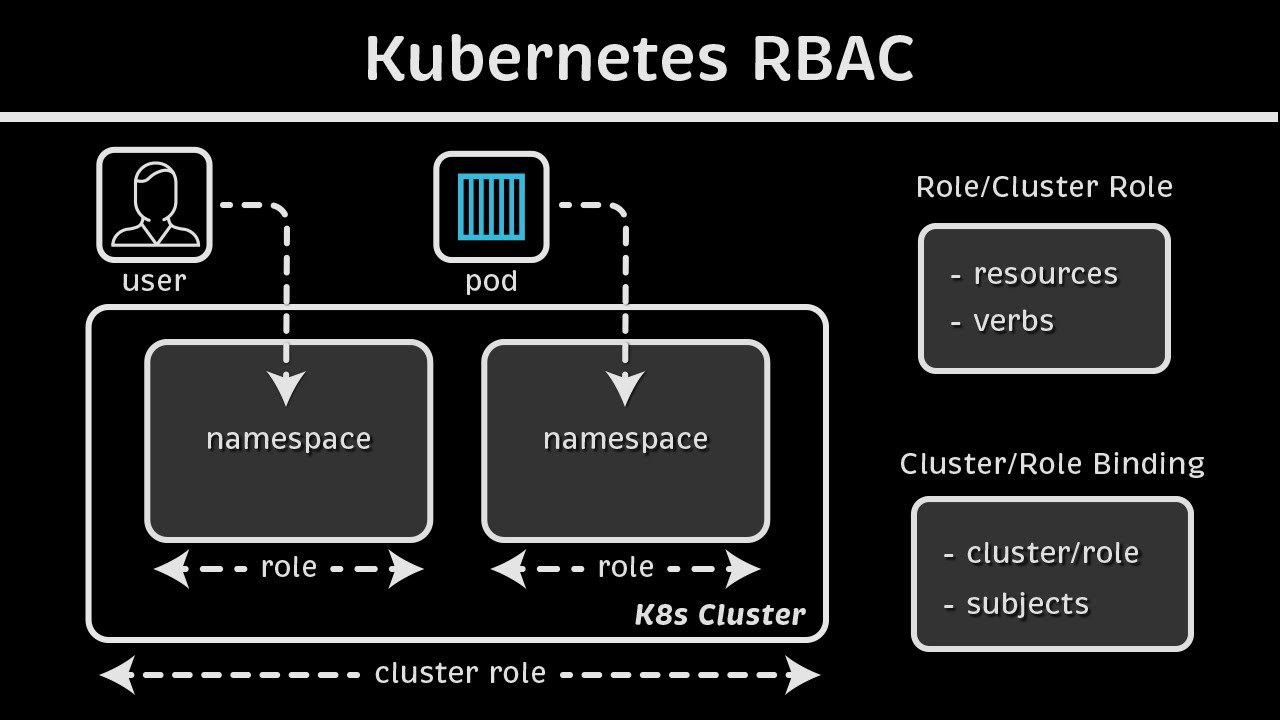
Kubernetes RBAC Explained
Source: YouTube · Anton Putra · published Apr 8, 2024 · 23:17
This video explains how Kubernetes Role-Based Access Control (RBAC) works to secure cluster resources by managing authorization after authentication 0:001:06.
Key Takeaways:
• The kube-apiserver authenticates requests and then uses RBAC to authorize actions, ensuring users only access permitted resources 0:401:06.
• RBAC consists of identities (users or service accounts), roles that define verbs like "get" or "list" on resources, and bindings that link them 4:518:3111:29.
• Roles and RoleBindings are namespaced, while ClusterRoles and ClusterRoleBindings manage cluster-wide resources like Persistent Volumes 14:5615:4617:14.
• A RoleBinding can reference a ClusterRole to grant high-level permissions within a specific namespace, reducing role duplication 20:2522:2522:43.
Understanding the scope of these objects is critical for implementing effective security policies 22:51.
Sources:
- 0:00 Kubectl apply overview
- 0:40 API server authentication and authorization
- 1:06 Role-Based Access Control (RBAC)
- 4:51 Identities, roles, and bindings
- 8:31 Defining permissions with verbs
- 11:29 Linking identities with RoleBindings
- 14:56 Cluster-scoped resources
- 15:46 ClusterRoles vs Roles
- 17:14 Namespace scope vs Cluster scope
- 20:25 Using RoleBinding with ClusterRole
- 22:25 RBAC limitations and behaviors
- 22:43(https://www.youtube.com/watch?v=iE9Qb8dHq
Generate CPE Credits
Generate a professional CPE document from this video's transcript.
Estimated credit: 0.5 CPE hours
Estimate uses the video runtime (1 hour ≈ 1 CPE, rounded to the nearest 0.5, minimum 0.5, maximum 2.0). The final amount can be lower after review, never higher.
Topic: Identity & Access Management. Commonly maps to: Identity and Access Management (IAM), Security Architecture and Engineering. Exact CISSP domains are assigned during generation.
Free account. One generation at a time, with a daily limit.
CPEBuddy is independent and not affiliated with or endorsed by ISC2, ISACA, or any certification body. Exports are formatted for common CPE submissions; acceptance is at your certification body's discretion.
Transcript Preview
First 800 characters of the transcript
Let’s say you want to deploy the following
pod to Kubernetes. You could use kubectl and apply the YAML file. Now, when you type
'kubectl apply', a few things happen. First of all, kubectl will read your local
Kubernetes config. Then it will reach out to the Kubernetes API server and discover
APIs. This simply means it will check the available APIs and how they can be used.
Then kubectl will perform client-side validation to check for any obvious errors
and typos in your YAML file. And finally, it will convert your pod to a JSON object and send
a request with that payload to the kube-apiserver. When the kube-apiserver receives a request, it does not store it immediately in the
etcd database. First, it has to verify that your request is legitimate. That is to
say, it has to authenti…